
Live Data for Planning Reports: UK Sources and Workflows
For a committee-ready planning report, your authoritative sources are council planning registers, the Planning Data API, and Gov. Use those three first. Add a monitored commercial feed when you need production-grade freshness monitoring, normalized schemas across multiple local authorities, or webhook alerts for status changes. Every record in your report must carry a direct link back to the council register page and a retrieval timestamp. Without that trail, a planning committee or credit assessor can challenge the entire submission.
Quick next step: run a test query against the Planning Data API using your site’s postcode or UPRN at https://www.planning.data.gov.uk/api/v1/entity.json?dataset=planning-application&postcode=YOUR_POSTCODE. If you’d rather skip the setup, Fortress Associates can source, verify, and format the full live-data bundle for you.
Key Takeaways
Council registers, the Planning Data API, and GOV.UK live tables are the three authoritative sources every UK planning report must draw from, with direct source links and retrieval timestamps on every record.
| Point | Details |
|---|---|
| Prioritize authoritative sources | Council registers and the Planning Data API provide traceable, linkable records that committees and lenders can verify. |
| Include source URLs and timestamps | Every record needs a direct council portal link and a retrieval date; without them, the evidence trail fails under scrutiny. |
| Match access method to workflow | Use API polling for live dashboards; use scheduled bulk snapshots for immutable committee archives. |
| Use normalized feeds for multi-LA work | Paid feeds save significant analyst time when covering 20 or more local authorities with consistent schema and freshness monitoring. |
| Fortress Associates for guaranteed output | Fortress Associates sources, verifies, and delivers committee-ready live-data reports with an amend-or-refund guarantee and no advance payment. |
Table of Contents
- What authoritative live data sources should you use for planning reports?
- How do you access live planning data through APIs, bulk downloads, and spatial queries?
- What fields does every live-data planning report need?
- How do you keep planning report data live, versioned, and auditable?
- How do you verify records and build a defensible evidence trail?
- When does it make sense to buy a normalized feed or commission a specialist?
- What do experienced consultants and developers get wrong with live planning data?
- Fortress Associates delivers committee-ready live-data planning reports
- Sources
What authoritative live data sources should you use for planning reports?
The sources below are not interchangeable. Each sits at a different level of the data hierarchy, and knowing which to cite for which purpose is what separates a defensible report from one that gets queried.
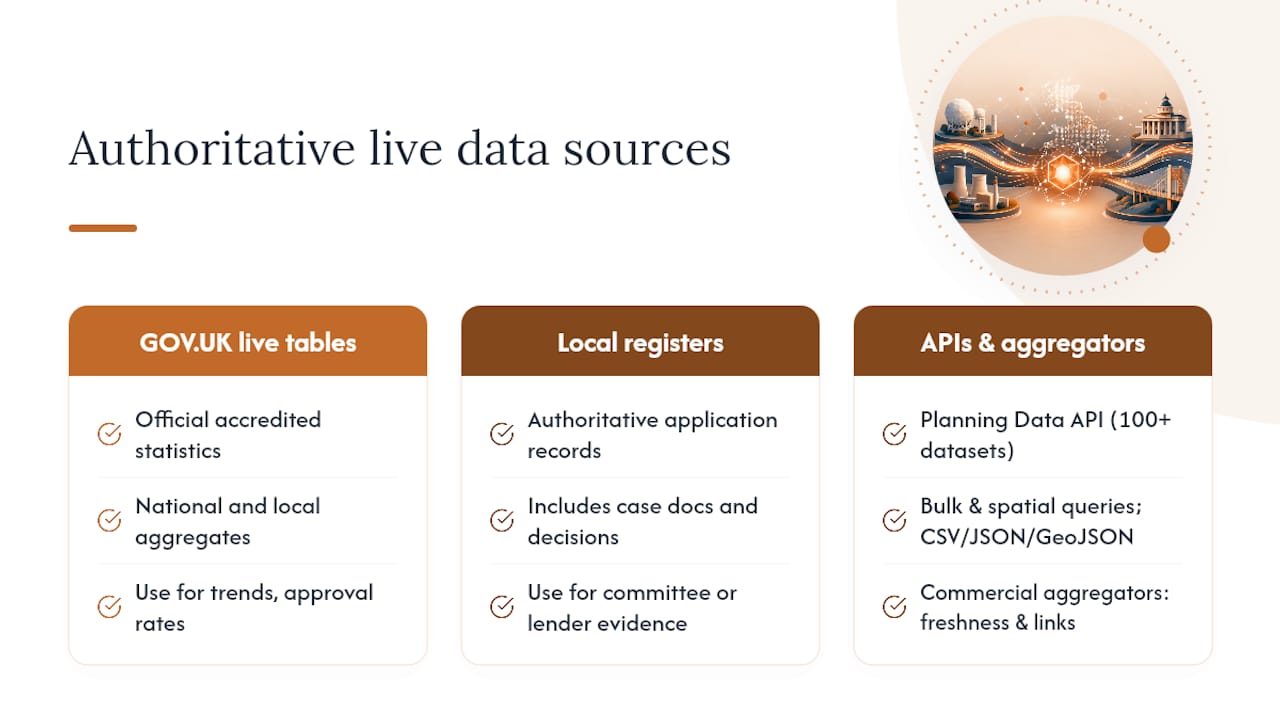
GOV.UK live tables on planning application statistics publish official accredited statistics for planning applications at both national and local authority level. Use these when your report needs to cite aggregate trends, approval rates, or volume benchmarks. They are the right reference for national context, not for individual application records.
Planning Data API / planning.data.gov.uk exposes over 100 planning and housing datasets through a single documented interface, including planning applications, conservation areas, listed buildings, and brownfield land registers. It supports CSV, JSON, and GeoJSON downloads, plus spatial and parameterized search. This is your go-to for bulk or spatial queries across multiple datasets and local authorities.
Local authority planning registers are the authoritative record for individual applications. Case documents, consultation deadlines, decision notices, and formal drawings all live here. When a committee or lender asks for evidence, the council portal is the source you link to. No aggregator or national dataset replaces it for this purpose. The GOV.UK register of planning decisions can help you locate the right portal by authority.
The Planning Portal is the primary submission channel for planning and building control applications across England and Wales. Its Market Insight Reports give you the earliest available signals on application volumes and trends, often before those figures appear in GOV.UK live tables.
GLA / Planning London Datahub is the live, interactive database the Greater London Authority operates for London-wide planning application and development proposal data. If your project sits within Greater London, the Planning London Datahub gives you city-level aggregation that no national dataset matches for spatial granularity.
Commercial aggregators like PlanningAPI normalize applications across councils into consistent JSON responses, add freshness metadata (first-seen and last-seen timestamps), and maintain direct links back to source records. Searchland similarly claims coverage of all UK council-published applications since 1990, with daily refresh schedules and occasional short lags. Use these when you are working across multiple local authorities and the cost of cleaning inconsistent portal formats yourself exceeds the subscription fee.
How do you access live planning data through APIs, bulk downloads, and spatial queries?
The access method you choose shapes how fresh your data is and how much maintenance it requires.
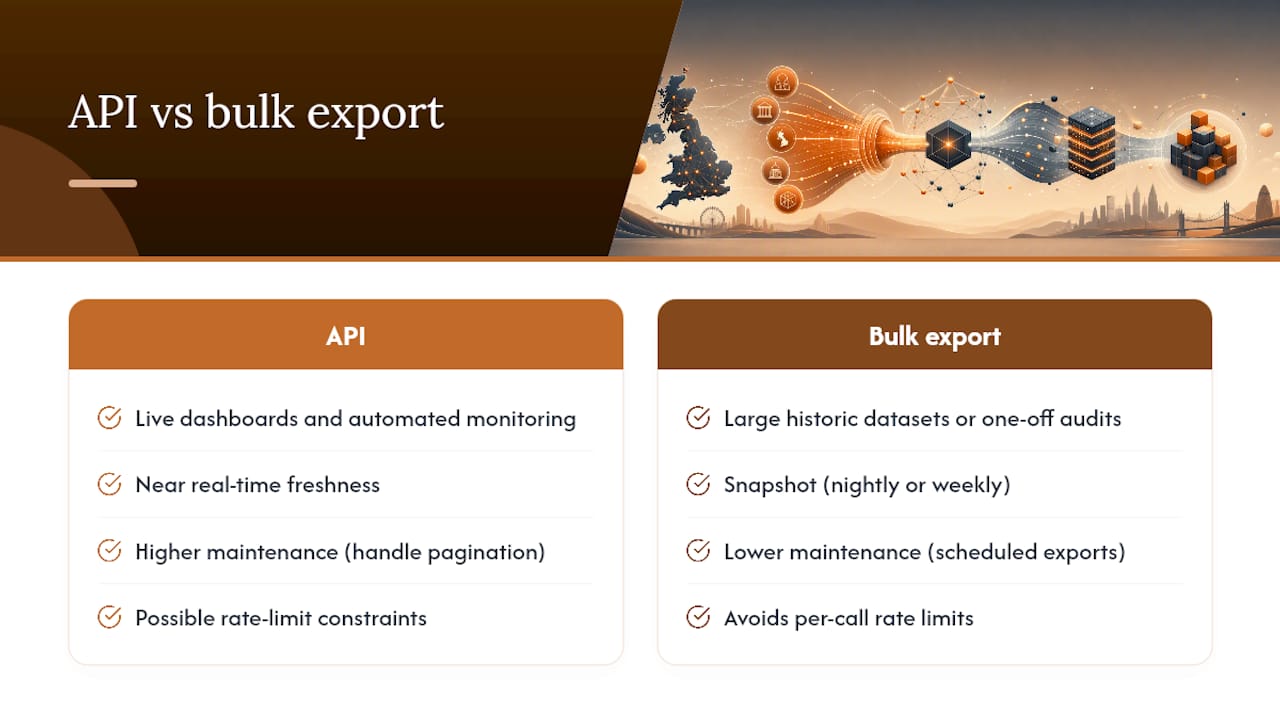
API vs. bulk download comes down to what you are building. For live dashboards or automated monitoring, the Planning Data API is the right tool. For large historic datasets or one-off audits, scheduled bulk exports in CSV or GeoJSON are faster and avoid rate-limit issues. The API supports pagination via limit and offset parameters, so large result sets are manageable, but a bulk snapshot is still more reliable for anything covering thousands of records.
Key API parameters you will use regularly: postcode, uprn, organisation (council code), geometry (WKT polygon for spatial queries), dataset, status, start-date, end-date, limit, and offset. The full parameter reference covers all available filters and response fields.
A practical radius query works like this: take your site postcode, convert it to a latitude/longitude coordinate pair (the OS Data Hub or a geocoding API handles this), then pass a circular WKT geometry to the Planning Data API’s geometry parameter. Set dataset=planning-application, add a status filter if you only want live or decided applications, and request format=json with include=attachments to pull document links in the same response. The response will include a reference field and a source-url pointing back to the council register.
Rate limits and bulk access: the Planning Data API does not publish a hard rate limit, but for large queries use the dataset download pages at planning.data.gov.uk/dataset/ to pull pre-built bulk exports rather than paginating through thousands of API calls. Schedule these exports nightly or weekly depending on your freshness requirement.
Format guidance: ingest JSON or GeoJSON when you need geometry or document relationships. Keep CSV exports for spreadsheet-based audit workflows and committee bundles. Before redistributing any extract, check the Open Government Licence v3 terms, which govern reuse of public sector information.
Pro Tip: Use the Fortress Associates free planning tools page to test postcode-based lookups across multiple data sources before committing to an API integration. It is a fast way to validate coverage for your target local authority.
What fields does every live-data planning report need?
A report that cannot be independently verified is a liability. The schema below is the minimum required for a committee-ready or credit-ready output.
| Field | JSON/CSV name | Why it matters |
|---|---|---|
| Application reference | reference |
Unique identifier for the record; links to council register |
| Council name and code | organisation, organisation-entity |
Identifies the determining authority |
| Address | address-text |
Human-readable site location |
| UPRN | uprn |
Unique Property Reference Number; enables cross-dataset matching |
| Status | status |
Current stage: submitted, pending, approved, refused, withdrawn |
| Date received | entry-date |
Establishes the application timeline |
| Decision date | decision-date |
Required for appeal window calculations |
| Decision outcome | decision |
Approved/refused/split; core for feasibility and due diligence |
| Proposal summary | description |
Describes the development; needed for committee context |
| Case officer | officer-name |
Contact for queries; required in some committee formats |
| Council register URL | source-url |
Direct link to authoritative record; non-negotiable for evidence trails |
| Decision notice PDF | document-url |
Links to the formal decision document |
| S106/CIL links | obligations-url |
Planning obligations and infrastructure levy records |
| Latitude/longitude | latitude, longitude |
Enables mapping and spatial analysis |
| Site geometry | geometry |
WKT or GeoJSON polygon for area calculations |
| First-seen timestamp | first-seen |
Establishes when the record entered your dataset |
| Last-seen timestamp | last-seen |
Confirms the record is still live and has not been removed |
| Source freshness note | freshness-note |
Flags if the record came from a normalized feed vs. direct portal |
The source-url and timestamp fields are the ones most often missing from DIY exports. They are also the first two things a planning committee or credit assessor asks for.
How do you keep planning report data live, versioned, and auditable?
Freshness is not just about how often you pull data. It is about being able to prove, after the fact, exactly what the data said on the day a committee bundle was submitted.
Polling vs. webhooks vs. bulk snapshots
| Method | Best for | Freshness | Auditability | Complexity |
|---|---|---|---|---|
| Short-interval polling | Active site monitoring, live dashboards | Near real-time | Moderate (logs required) | Low |
| Webhooks / change events | Automated alerts on status changes | Real-time | High (event log) | Medium |
| Scheduled bulk snapshots | Historic archives, committee bundles | Daily or weekly | Very high (immutable files) | Low |
For most planning report workflows, a combination works best: webhooks or short polling for active monitoring of specific applications, daily decision-status sweeps for sites in determination, and weekly bulk snapshots stored as immutable files for the archive.
Versioning checklist
- Store a
first-seenandlast-seentimestamp on every record. - Log every status transition (e.g., “pending” → “approved”) with a dated change entry.
- Save daily snapshots as immutable files (named by date) so you can reconstruct the exact dataset used for any committee submission.
- Keep the
source-urland retrieval timestamp with every snapshot, not just the live record.
Caching guidance
For live dashboards, use a short TTL of 15–60 minutes. For archived reports, cache indefinitely but always store the original retrieval timestamp alongside the cached record. A cached record without a timestamp is not auditable.
Pro Tip: Log source health and freshness per council in your pipeline. Some council portals go offline for maintenance or change their URL structures without notice. A silent gap in coverage can leave a committee bundle missing records for an entire local authority. PlanWire’s UK planning data guidance covers practical approaches to monitoring feed health across councils.
How do you verify records and build a defensible evidence trail?
A planning report is only as strong as its evidence trail. Here is the citation format and verification checklist to use before any record goes into a final document.
Citation template for a council record:
London Borough of Southwark, Application Reference 23/AP/1234, Southwark, retrieved 14 March 2026.
Every citation needs: council name, application reference, direct URL to the register page, and retrieval date. That four-part format satisfies both planning committee requirements and credit-assessment audit trails.
Verification steps before including a record:
- Confirm the
source-urlopens and displays the correct application. - Check the consultation end date on the council portal (not just in your dataset).
- Verify the decision notice PDF is accessible and matches the
decisionfield in your data. - For S106 or CIL entries, confirm the obligation document is linked and dated.
- For appeals, check the Planning Inspectorate’s case search separately - appeal outcomes are often stored outside the council portal and are missed by aggregators.
Provenance appendix checklist for the report:
- List every source URL used, with dataset ID and retrieval timestamp.
- Note any enrichment applied (e.g., UPRN matched via OS AddressBase, geometry geocoded via OS Data Hub).
- Flag any records where the council portal was unavailable and a normalized feed was used as a fallback.
For decision-sensitive items, add a caveat paragraph in the report body: state the retrieval date, note that planning conditions, obligations, and appeal outcomes are subject to change, and direct the reader to the council register for the current position.
When does it make sense to buy a normalized feed or commission a specialist?
The honest answer is: it depends on how many local authorities you cover and how much analyst time you have.
The core trade-off is staff time spent cleaning inconsistent council portal formats against the cost of a subscription to a normalized feed. A single-site report for one local authority is usually faster to do directly against the council portal and the Planning Data API. A multi-site pipeline covering 20 or more local authorities, or a recurring monitoring brief, is almost always cheaper with a normalized feed once you factor in the ongoing maintenance cost.
Pros of paid normalized feeds:
- Consistent schema across all councils from day one
- Freshness monitoring and change-event alerts built in
- Enrichment fields (appeals, enforcement, S106 links) already matched
- Webhook support for automated workflows
- Faster integration for developers
Cons:
- Subscription cost (varies by provider and query volume)
- Vendor lock-in if you build tightly against a proprietary schema
- You still need to verify source links before citing records in formal reports
Vendor selection criteria worth checking before committing: source-link fidelity (does every record carry a direct URL to the council portal?), freshness metadata (first-seen/last-seen timestamps), monitored coverage per council (does the provider flag gaps?), webhook or change-event support, SLA for data freshness, and export formats. PlanningAPI publishes its coverage and freshness metadata openly, which makes it easier to audit before you sign up. Searchland’s planning application API is another option for enriched historic and current data.
For a site constraints appraisal that combines planning application history with constraint datasets, a normalized feed paired with a structured report template cuts turnaround from days to hours.
When the output is a formal committee bundle or a report for a lender or credit assessor, commissioning Fortress Associates is the lowest-risk path. The turnaround is fixed, the source links and freshness metadata are preserved in every deliverable, and the amend-or-refund guarantee removes the rework risk entirely.
What do experienced consultants and developers get wrong with live planning data?
Three mistakes account for most of the rework on planning data reports.
Trusting third-party summaries without source links is the most common. A planning data aggregator may show “approved” for an application that was actually approved subject to conditions, with a S106 obligation that materially affects the site. If your report does not link to the decision notice PDF, a committee member or solicitor will find the discrepancy and the report goes back for revision.
Failing to track first-seen and last-seen timestamps creates a different problem. If a record disappears from a council portal (withdrawn applications sometimes do), and your report does not have a first-seen timestamp and a snapshot, you cannot prove the application existed when you cited it. That is a serious gap in an evidence trail.
Ignoring appeals and enforcement records is the third. Appeal outcomes are held by the Planning Inspectorate, not the council portal, and enforcement notices are often in a separate register. A report that covers application history but misses a live enforcement notice on the same site is incomplete.
The quick fixes are straightforward: require a source-url column in every data export, run a daily automated check for decision-status changes on active sites, and include a one-page provenance appendix with every formal report. On one project, a missing source link on a single application reference delayed a planning committee decision by three weeks while the consultant tracked down the original council record. Adding the direct URL to the citation resolved the query in one exchange.
Fortress Associates delivers committee-ready live-data planning reports
Commissioning a planning report that actually holds up under scrutiny takes more than pulling an API response into a spreadsheet. Fortress Associates sources data directly from council registers and the Planning Data API, verifies every record against the live portal, and formats the output as a committee-ready bundle with a full provenance appendix.

Every planning report includes direct source links, retrieval timestamps, and freshness metadata for each record. S106, CIL, and appeal checks are included where relevant to the scope. The amend-or-refund guarantee covers any report that is queried or rejected. No advance payment is required. To get a quote, send the site address, UPRN if known, and the scope (application history only, or full decision and obligations check). Fortress Associates will confirm turnaround and cost before any work begins. Start your report at Clockfortress.
Sources
- Planning
- Gov
- The Planning Portal
- The Planning London Datahub - Greater London Authority
- PlanningAPI UK
- Open Government Licence v3 - The National Archives
Recommended
- 21 Free UK Planning Tools - Constraints, Flood, Fees, Daylight | Fortress Associates
- UK Planning Reports - Daylight, Flood Risk, Air Quality, Energy | Fortress Associates
- Free UK Planning Tools: Flood Zone, AQMA, Daylight, Carbon, BNG - Fortress Associates
- Daylight Report Blog - UK BRE 2022 Insights | Fortress Associates
Need help with a UK planning project?
Fixed-fee daylight & sunlight reports and Building Regulations drawings - plus flood risk assessments, air quality assessments, energy statements and sustainability statements for planning applications across the UK.
Request a free quote