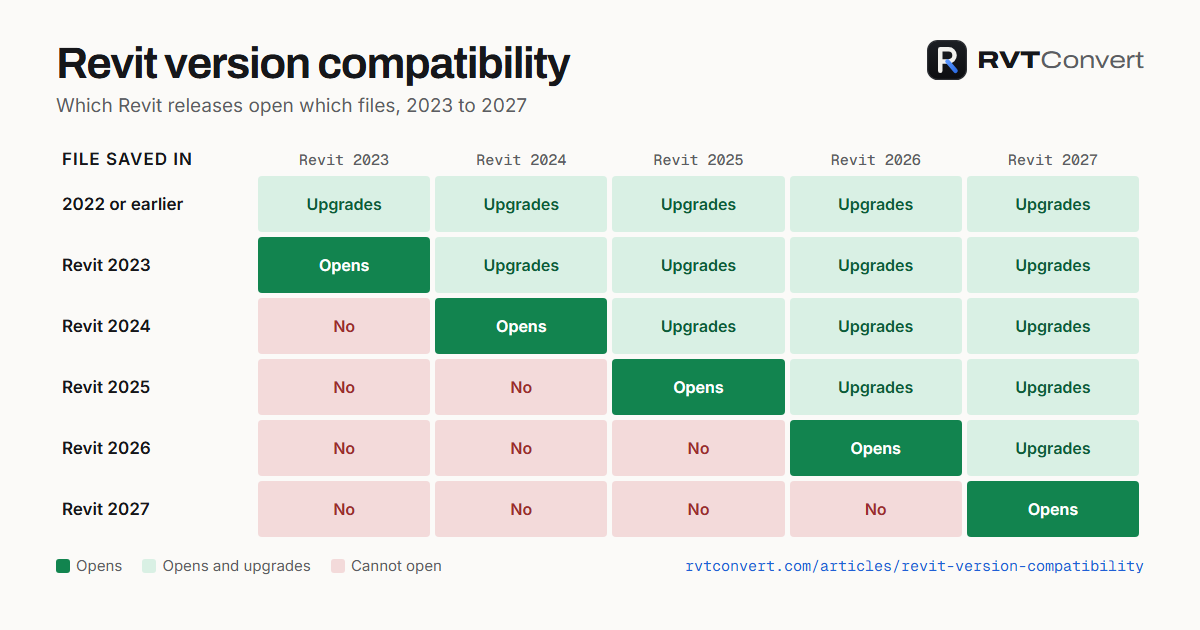
If an architect sends you a Revit model your copy of Revit will not open, a free Revit version checker tells you which release saved it in seconds, and a free Revit converter can save it as Revit 2023 so it opens in every release from 2023 to 2027. Revit itself cannot save a model back to an older version.
Planning work depends on models moving between firms. Consultants preparing daylight and sunlight reports, energy statements or drawings often receive the architect's Revit model, and the two firms are rarely on the same Revit release. This guide covers how to check a file's version, which releases open which files, and how to get a newer file into an older release, using free tools that need no sign-up.
Why do Revit versions cause problems on planning projects?
Revit only opens files saved in its own release or an earlier one. Autodesk's support article on backward compatibility confirms Revit has no feature to save to an older version's format. So if the architect has moved to Revit 2026 and a consultant is still on Revit 2024, the consultant's Revit refuses the file with a message that it was saved in a later version.
It usually surfaces at the worst moment: the model arrives a few days before a planning submission, and the person who needs it cannot open it. Knowing the version before you start, and having a way to convert the file, avoids that delay.
How do you check which Revit version saved a file?
There are two quick ways, and neither changes the file.
| Method | What you need | What it tells you |
|---|---|---|
| Revit's Open dialog | An installed copy of Revit | Select the file once (do not open it) and the dialog shows the release that last saved it |
| Free Revit version checker | A web browser | Release, exact build and update, worksharing status and which releases can open it, for one file or a whole folder, with a CSV download |
The folder check is the useful one for a consultant receiving a full model issue: drop the issued folder in and every project, family and template is listed with its release, so you know straight away whether anything is newer than your Revit.
Which Revit releases open which files?
A file opens in the release that saved it and every later release, upgrading as it opens. It never opens in an earlier release.
| File saved in | Opens in |
|---|---|
| Revit 2023 | Revit 2023, 2024, 2025, 2026 and 2027 |
| Revit 2024 | Revit 2024, 2025, 2026 and 2027 |
| Revit 2025 | Revit 2025, 2026 and 2027 |
| Revit 2026 | Revit 2026 and 2027 |
| Revit 2027 | Revit 2027 only |
That is why Revit 2023 makes such a useful exchange format: a Revit 2023 file opens in all five current releases. The chart at the top of this post is free to reuse with a credit link, from the Revit version compatibility guide.
How do you convert a Revit file to an older version?
RVT Convert is a free online tool that converts Revit 2024, 2025, 2026 and 2027 files to Revit 2023. It works for projects (.rvt), families (.rfa), project templates (.rte) and family templates (.rft).
- Ask the architect to save and close the model, so the copy holds the latest changes.
- Upload the file to RVT Convert and choose Convert to Revit 2023. Most files take a minute or two.
- Download the Revit 2023 copy and open it in your release. Revit 2024 or 2025 upgrade it as it opens.
The architect's own model stays in their release, unchanged. If you need a specific release, for example Revit 2025, open the Revit 2023 copy in Revit 2025 and save it there.
How do you find the exact Revit update you are running?
Two people on the same Revit year can be on different updates. In Revit, Help > About shows the build number, a date stamp such as 20250908_1515. The free Revit build numbers list matches every build from Revit 2022 to 2027 to its update, from Autodesk's own table; that build is Revit 2026.3.
Frequently asked questions
Can Revit 2024 open a Revit 2026 file?
No. Revit cannot open files saved in a later release. Convert the file to Revit 2023, which Revit 2024 opens and upgrades.
Does checking a file's version change it?
No. Selecting a file in Revit's Open dialog or checking it with the online version checker leaves it exactly as it was. Only opening and saving it in a newer release changes it.
Can I convert Revit families as well as projects?
Yes. Families and family templates convert the same way as projects, and a family saved as Revit 2023 loads into projects in Revit 2023 to 2027.
Are these tools free?
Yes. The version checker, the build numbers list and the converter are free to use, with no account needed.
Key takeaways
- Revit opens files from its own release and earlier ones, never later ones, and cannot save back to an older version.
- Check a file's release before you start: Revit's Open dialog or the free online version checker, which also handles whole folders.
- A Revit 2023 file opens in every release from 2023 to 2027, which makes it the safest format to exchange.
- Convert Revit 2024 to 2027 files to Revit 2023 with a free online converter when someone cannot open them.
More free tools
Working on a planning application? Our free UK planning tools cover flood zones, daylight, fees, permitted development and more, and our services cover the reports councils ask for. Questions about a project? Contact us.
Sources & further reading
Need help with a UK planning project?
Fixed-fee daylight & sunlight reports and Building Regulations drawings - delivered in 4–5 working days, no advance payment - plus flood risk assessments, air quality assessments, energy statements and sustainability statements for planning applications across the UK.
Request a free quote